How to Fix Frequency Masking: Complementary EQ to Trackspacer & AI Plugins
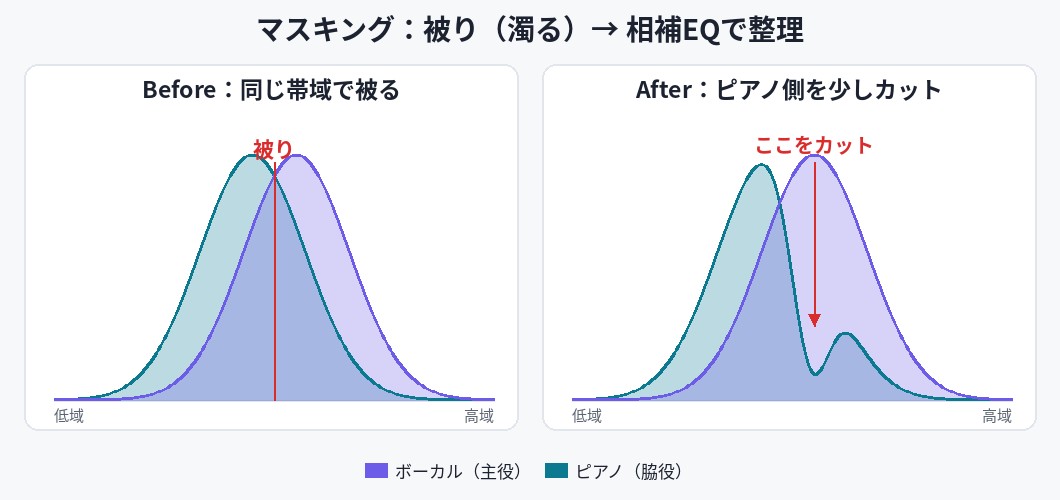
Play a vocal and a piano at the same time and "the vocal drops back and gets hard to hear," "the sounds pile up and everything turns hazy." Or the low end gets muddy and loses punch exactly when the kick and bass overlap. In beatmaking and mixing alike, this happens a lot.
A big cause of these problems is a phenomenon called "frequency masking" (sounds covering each other). In this article, starting from why masking happens, we'll work through actual fixes in this order: (1) the basic complementary EQ (manual adjustment) → (2) sidechain / dynamic EQ → (3) dedicated plugins. All prices and specs below were verified by our team on the official sites and Plugin Boutique as of September 22, 2026.
What is frequency masking?
Masking is a phenomenon where instruments occupying the same frequency band collide, and one sound makes the other harder to hear. When a part has plenty of level yet still feels "buried for some reason," masking is often the cause.
Common colliding pairs include the following (bands are rough guides and shift with the source and the voice):
- The mids-to-upper-mids that carry vocal clarity (roughly around 1-3 kHz) versus piano or guitar chord backing
- The body of the kick (roughly around 60-100 Hz) versus the fundamental and core of the bass
- A two-mix sample versus the drums you layer on top later
The more the sounds share the same band and play at the same moment, the stronger the masking. Put another way, just having one side make a little room makes both parts noticeably easier to hear. That is the basic idea behind fixing masking.
[Basics] Complementary EQ — the basic idea is to "give each other a seat"
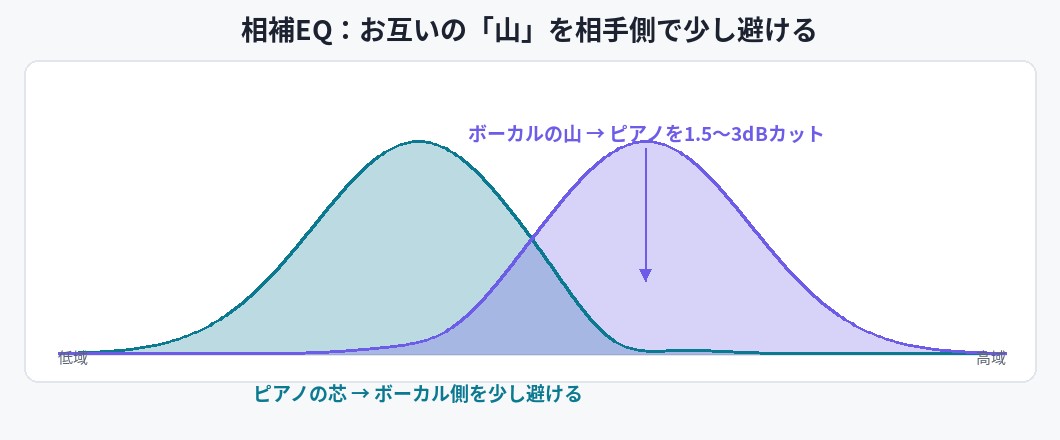
The foundation of fixing masking is using EQ to adjust each sound's bands a little so they don't collide, making room. This is called complementary EQ. The key is not to gut one sound heavily. The basic idea is to slightly avoid, on your own side, only the band that matters to the other part.
Manual EQ steps (example: vocal and piano)
- Find the sweet spot of the lead (vocal) — solo it and look for the point where presence and cut-through peak (e.g., around 2 kHz).
- On the supporting part (piano), cut that band pinpoint — set a fairly wide Q and pull it down a natural 1.5-3 dB. Cutting too much loses the piano's body, so a light touch is the rule.
- Conversely, slightly avoid the piano's sweet spot (e.g., the low-mids around 300 Hz) on the vocal side — the point is to make room for each other rather than "only cutting one side."
The idea is identical for the kick-and-bass low end. Concrete examples of avoiding the other's "peak" by roughly 1-2 dB, with numbers, are covered in the complementary-EQ section of our mix template article.
Some EQs let you cut "while looking" at overlaid spectra
High-end EQs like FabFilter Pro-Q 4 include a feature that shows another track's spectrum on the same screen so you can see where bands collide (collision detection) (per FabFilter's official feature description). Rather than hunting by ear alone, you can visually confirm which bands are clashing, which speeds up the work.
That said, manual complementary EQ means more spots to adjust as your track count grows. That's where the next option — "making room automatically" — comes in.
The next move — sidechain and dynamic EQ
A normal EQ is a "static" process: once set, it keeps cutting the band all the time. So the sound can thin out even when the other part isn't playing. That's why we use dynamic adjustment that only acts the moment the other sound plays.
- Sidechain compression: use the other part (e.g., the kick) as a trigger to briefly drop the whole level of your sound (e.g., the bass). You can't target narrow bands, but any DAW's stock compressor can do it.
- Dynamic EQ: lower only a specific band when it crosses a set threshold. With a product that supports sidechain input, you can do things like "dip the bass around 60-80 Hz only when the kick hits."
For free options, there's the classic TDR Nova and the open-source ZL Equalizer (external sidechain / dynamic EQ). For free plugins, see our roundup of go-to free VSTs. From here we'll cover plugins that specialize in and automate this "dynamic dip."
The classic reduction tool: Wavesfactory Trackspacer
As a dedicated tool for fixing masking, Wavesfactory's Trackspacer is a name that comes up often. The official site presents it as an "award winning" plugin, and on Plugin Boutique it has a 4.7 rating from over 10,000 ratings (as of September 22, 2026).
The tutorial video below (in English, an explainer-channel video rather than an official Wavesfactory one) gives a clear picture of how it works.
How it works: dip in 32 bands following the "shape" of the sidechain
Per the official description, Trackspacer splits the signal received via sidechain into 32 bands, analyzes it in real time, and applies the inverse EQ curve to the target track. In other words, it "cuts only the band where the other sound is playing, only while it plays." Its detection differs from a typical compressor that reacts to overall level, and the official line is that it gives a more natural, transparent result.
Basic operation is just turning the big central knob to set the amount, but for finer control you can limit the processing range with low-cut / high-cut, and adjust attack / release and the stereo-to-M/S range (per Wavesfactory's official specs).
Where it shines in hip hop and boom bap
- Kick → bass: put Trackspacer on the bass and send the kick to its sidechain input. The moment the kick hits, the bass dips in the kick's band, so you can push the kick forward while keeping the low-end weight.
- Drums → sample: in the style of layering drums over a finished two-mix sample, put Trackspacer on the sample and trigger it from the drums, making room in the sample only when the drums hit.
For the basics of sound design and routing for the kick and bass on their own, reading alongside our boom bap mix template article makes the flow easier to follow.
AI / automatic tools: sonible smart:EQ 4 / pure:unmask / Neutron 5 Unmask
If you want to automate the very judgment of "where to cut," AI / auto-analysis plugins are handy. The current products our team verified on each official site as of September 22, 2026 are below.
| Product | Regular price | How it works (per official) | Best for |
|---|---|---|---|
| Wavesfactory Trackspacer |
$59 | Analyzes the sidechain signal in 32 bands and applies the inverse EQ curve | Clearly opening up a supporting part for a lead (Hip Hop / EDM) |
| sonible smart:EQ 4 |
$129 | Corrects tonal balance with the AI smart:filter. Group up to 10 tracks by drag & drop and sort out overlaps across front / mid / back tiers. Regular bands can also work as a dynamic EQ | Balancing several tracks overall at once |
| sonible pure:unmask |
$39 | Spectral unmasking between two tracks. Receive the track you want to prioritize via sidechain and just pick a profile — minimal setup | Just two specific tracks (kick vs bass, vocal vs backing) quickly |
| iZotope Neutron 5 (Unmask) |
$249 (Neutron 5 full) |
The Unmask module splits the competing bands between two tracks into 32 bands for spectral processing. The Masking Meter visualizes the overlap | Shaping the whole mix with Neutron's module set |
*Prices are the regular prices (USD) listed on each official site and Plugin Boutique as of September 22, 2026. All of these products often go on sale, so check the latest price before buying.
smart:EQ 4 is available from the Plugin Boutique product page, and pure:unmask from this product page. For the full picture of Neutron 5, including Unmask and the Masking Meter, see our Neutron 5 review.
How to choose
- Blend several tracks naturally (pop styles / overall tidy-up) → smart:EQ 4 (grouping) or Neutron 5
- Push the lead forward (Hip Hop / Boom Bap / EDM kick, 808, vocal) → Trackspacer
- Resolve masking between just two tracks at the lowest cost → pure:unmask
[Practice] Sidechain setup steps, and adjusting without overdoing it
"Sidechain sounds hard," you might think, but two-track plugins like Trackspacer and pure:unmask share the same basic flow. There are only three things to do.
- Put the plugin on the "side you want to push back" (e.g., the bass, or the sample).
- Use your DAW's sidechain feature to send the "side you want to prioritize" (e.g., the kick, or the vocal). Routing differs by DAW, so check the "sidechain" section of your DAW's manual.
- While playing back, raise the amount knob little by little. Watch and listen for the overlapping band dipping the moment the trigger (kick) hits, and stop at the minimum amount where you feel the effect.
The thing to watch out for is simply not overdoing it. Trying to remove overlap entirely also strips away the "gritty cohesion" that boom bap and rock rely on, leaving a clean but gutless sound. Keep the amount (or the Mix / Dry-Wet knob where a product has one) modest and stop at "the least amount where the mud stops bothering you." To check level and loudness after processing, our site's loudness meter tool (free) comes in handy.
Analysis tools like these also have the benefit of "letting you judge from data, unaffected by your room." In a room without a solid monitoring setup, it's easy to hear the low-end swell as bigger than it is and cut too much. Still, the final call should be made by comparing against a reference track and using your own ears.
FAQ
Q1. How much does Wavesfactory Trackspacer cost?
A. The regular price at Plugin Boutique is $59.00. As of our check on September 22, 2026, there was no active sale and it was at full price. It goes on sale often, so if you don't need to buy right away, waiting for a discount is one good approach.
Q2. Should I choose Trackspacer or an AI plugin like smart:EQ 4?
A. If you want to clearly open up a supporting part's band for a lead such as a kick or vocal, Trackspacer is a good fit. If you want to balance the tonal blend of several tracks at once, sonible smart:EQ 4 suits better. If you just want to quickly resolve masking between two specific tracks, the low-cost pure:unmask is another option.
Q3. Can I deal with masking for free?
A. Yes. Basic complementary EQ can be done with your DAW's stock EQ alone, and for free dynamic EQ there are TDR Nova and the open-source ZL Equalizer (with sidechain support). First understand the mechanics with manual EQ, then bring in a dedicated plugin once you want to save time.
Q4. What should I do first for low-end masking?
A. Start by tidying unnecessary low end with a high-pass filter and making the low end mono. Then have the kick and bass give up 1-2 dB each in the other's sweet spot with complementary EQ, and low-end mud gets noticeably lighter. Concrete numbers are covered in our mix template article.
Summary
The efficient way to learn masking fixes is in order: (1) understand the basic idea of making room for each other with complementary EQ, (2) dip "only the moment it plays" with dynamic processing (sidechain / dynamic EQ), and (3) automate with a dedicated plugin once your track count grows.
In hip hop and beatmaking especially, "overlap between two sounds" — kick vs bass, drums vs sample — is a major cause of mud. Try finishing one track with manual complementary EQ first, and when you think "doing this every time is a hassle," that's the time to consider a dedicated tool like Trackspacer — a lean way to bring one in.